Type in English and get Taiwanese Mandarin. Paste Traditional Chinese you can't read and get English. Results always show Taiwanese Mandarin with Zhuyin (Bopomofo) or Pinyin, and you can tap any word to hear how it sounds in Taiwan. Made for people who study, live or work in Taiwan.
In the app, you can do this with every character in text you paste or photograph.
Tap a character to see its reading and meaning and hear it
Tap any character to try it.
1st tone
2nd tone
3rd tone
4th tone
Neutral tone
Example: 我想喝珍珠奶茶 (I want to drink bubble tea). The audio here uses your browser's speech. The app plays Taiwanese Mandarin audio.
Features
Translate. Listen. Talk.
For everything in Taiwanese Mandarin you can't read yet, or can't say yet.
Translate
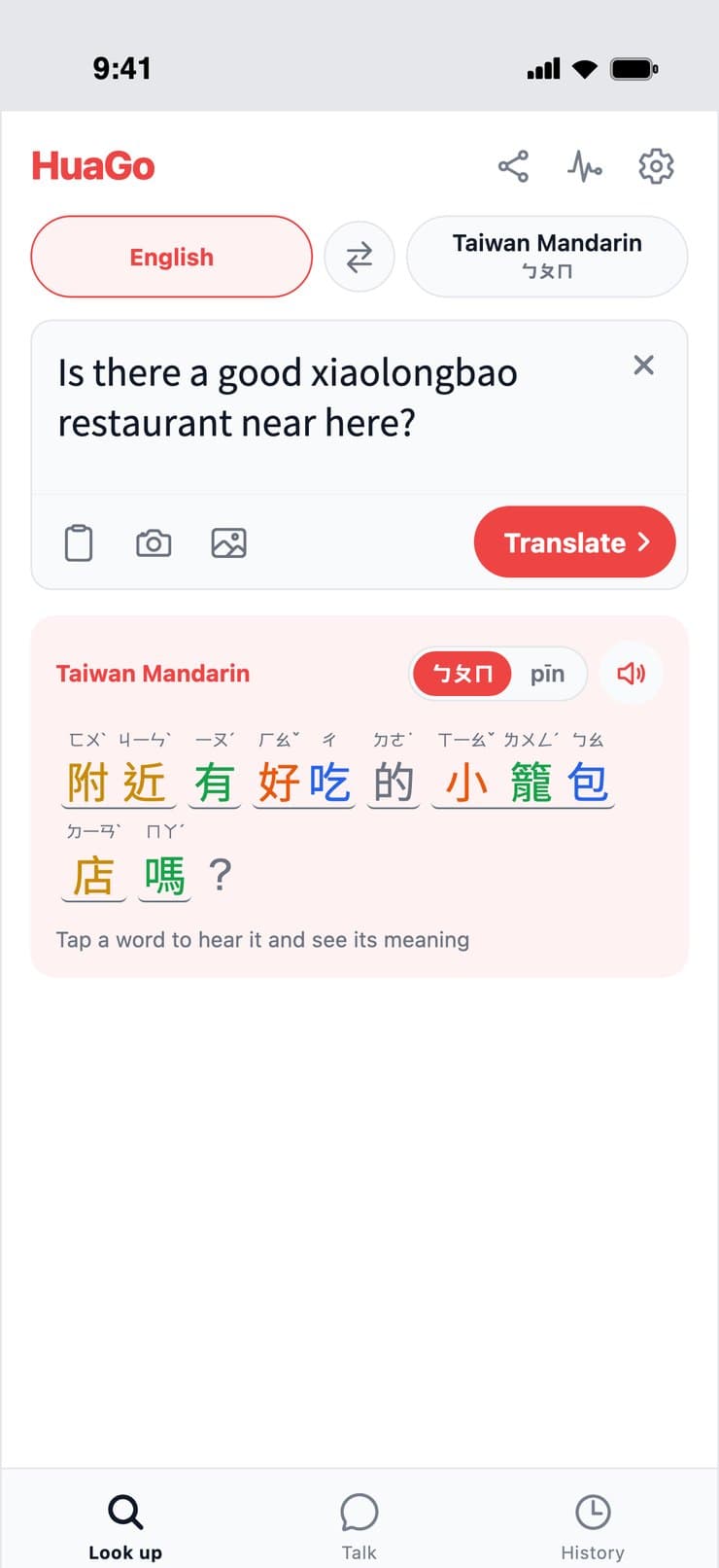
Type in English, get Taiwanese Mandarin with Zhuyin
Tap ⇄ to switch between English to Taiwanese Mandarin and Taiwanese Mandarin to English. Either way, the result is Taiwanese Mandarin split into words, with Zhuyin (Bopomofo) or Pinyin above each character and tones shown in color.
English ⇄ Taiwanese Mandarin
Zhuyin or Pinyin
English translation
Listen
Tap a word to hear how Taiwan says it
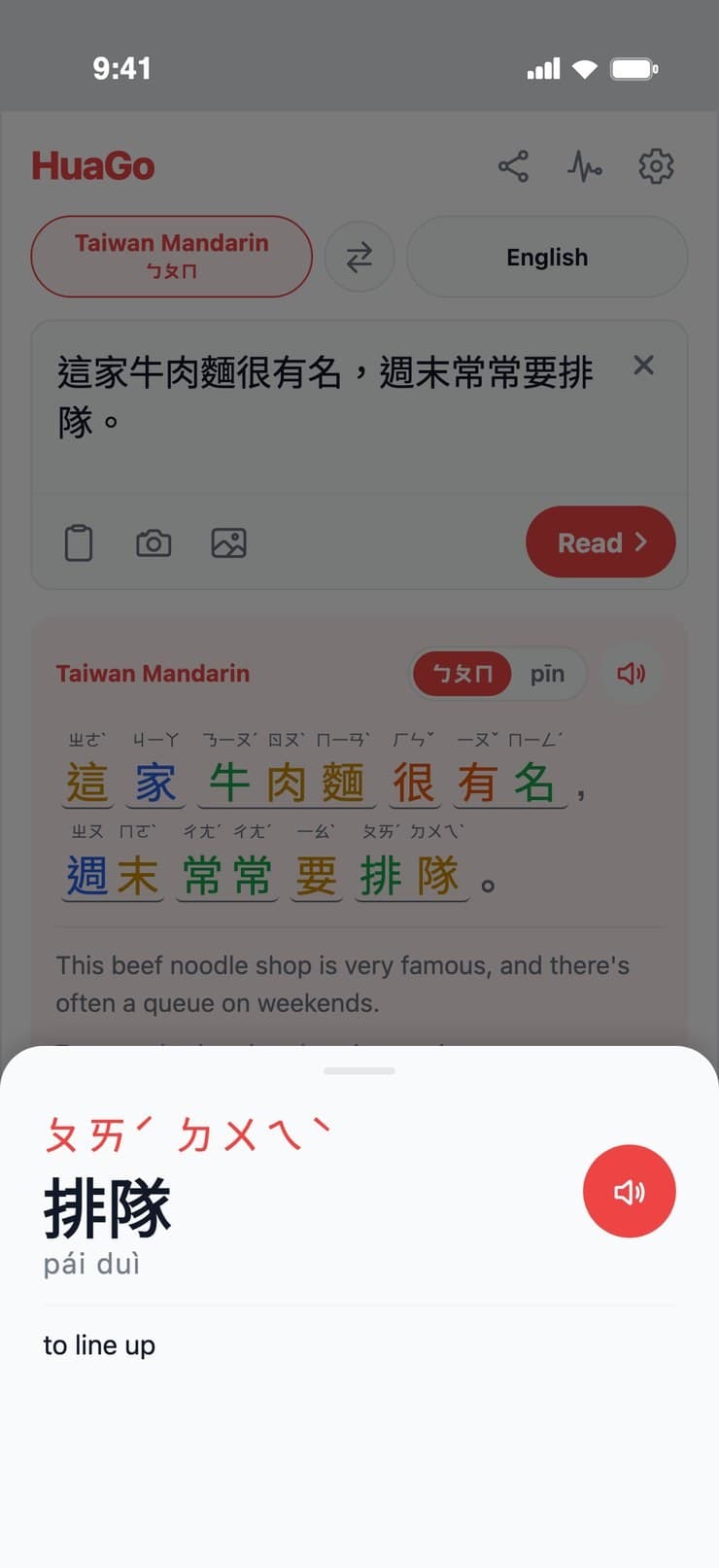
Tap any word and it plays right away. Press and hold it to see its Zhuyin, Pinyin and meaning. You can also play the whole sentence.
Taiwanese Mandarin audio
Press and hold for meaning
Play the whole sentence
Talk
Talk face to face with Taiwanese people
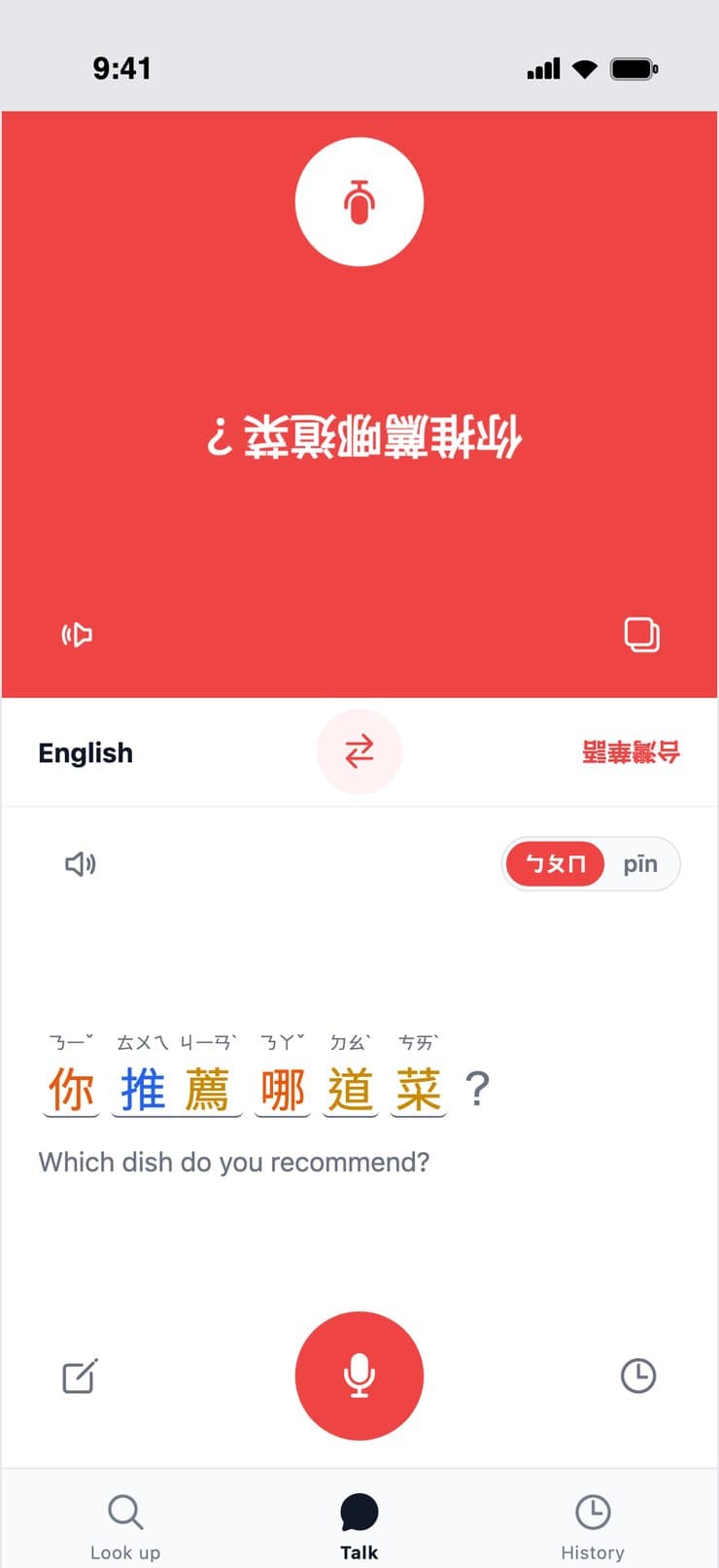
The top half of the screen is shown upside down for the person across from you. Tap the mic and speak English: HuaGo translates it into Taiwanese Mandarin and reads it aloud. When they speak Chinese, it is translated into English. Their words also appear on your side with Zhuyin, so you learn how to say it.
Voice or keyboard
Large text for the other person
Saved to History
Basics
Nothing to set up
Zhuyin or Pinyin
Switch any time on the result. Use Zhuyin (Bopomofo), taught in Taiwanese schools, or Pinyin.
Paste or take a photo
Paste text you copied, or photograph a menu or sign and choose the area to read.
Everything is saved in History
Translations and conversations are saved automatically. Tap one to open it again.
No account needed
Start right away. We never ask for your email address or a password.
Free, no ads
Every feature is free. No ads and no in-app purchases.
Made for Taiwan
Only the Chinese used in Taiwan
Most Chinese apps assume Simplified characters and mainland pronunciation. If you study, live or work in Taiwan, you need the Chinese of Taiwan.
Traditional characters
Everything is in Traditional Chinese, the characters you see on every sign in Taiwan.
Zhuyin (Bopomofo)
Zhuyin is what Taiwanese schools and phone keyboards use. If you only know Pinyin, switch and compare.
Taiwanese pronunciation
Readings follow Taiwan's Ministry of Education dictionaries. Some words are read differently from the mainland (e.g. 垃圾, 星期).
HuaGo is for Taiwanese Mandarin (the Chinese spoken in Taiwan), not Taiwanese Hokkien.
Who makes it
Built by a Japanese student at a university in Taiwan
When I came to Taiwan, I couldn't read my textbooks, and every page meant switching between a translator and a dictionary. I hated how looking things up stopped my studying, so I built an app where one tap shows the reading, the meaning and the sound. That was the start of HuaGo.
The result is always Taiwanese Mandarin with Zhuyin (Bopomofo) or Pinyin. It is split into words with tones in color, and you can tap any word to hear the Taiwanese pronunciation, or hold it to see its meaning, so you can check how to actually say it.
What is Zhuyin (Bopomofo)?
Zhuyin is the phonetic alphabet used for Mandarin in Taiwan. Its 37 symbols (ㄅㄆㄇㄈ…) and tone marks show how each character is read. It is used in Taiwanese school books and on phone keyboards. HuaGo can show Zhuyin or Pinyin above every character.
Can I use it to talk with Taiwanese people?
Yes. The Talk tab shows the top half of the screen to the person across from you and translates what each of you says. Voice input is not recorded or stored. In the web version, voice input may not work in some browsers; you can type instead.
Is it free?
Yes. Every feature is free. No ads and no in-app purchases.
Do I need an account?
No. Install it and start right away. We never ask for your email address or a password.
Can I use it on Android or a computer?
The app is for iPhone and iPad for now. On Android or a computer, use the web version (it requires signing in with a Google account).
Is this for Taiwanese Hokkien?
No. It is for Taiwanese Mandarin, the Chinese spoken in Taiwan.
Can I use it for Simplified Chinese or mainland Mandarin?
HuaGo is built around Traditional characters and Taiwanese pronunciation, so it is not a good fit for Simplified Chinese or mainland pronunciation.
 HuaGo